Detecting Text(OCR) in a ScreenShot of Hentai game Using Google Cloud Vision
This article is poor translation of my previous article in japanese.
There is a article(in japanese) tried text detection for SS(ScreenShot) of hentai game(visual novel). I have tried same thing, but I didn't get good results.I think this results caused by rate of permeability of text box. It is usual text box placed on a background image, raising rate of permeability makes non-uniform noise for text detection.
There are many OCR software or API, Tesseract, Google Cloud Vision, and so on. In this article, I use Google Cloud Vision. I tried Tesseract 3.x too, but it did not go well. *1
Skipping the details, I will show the results.
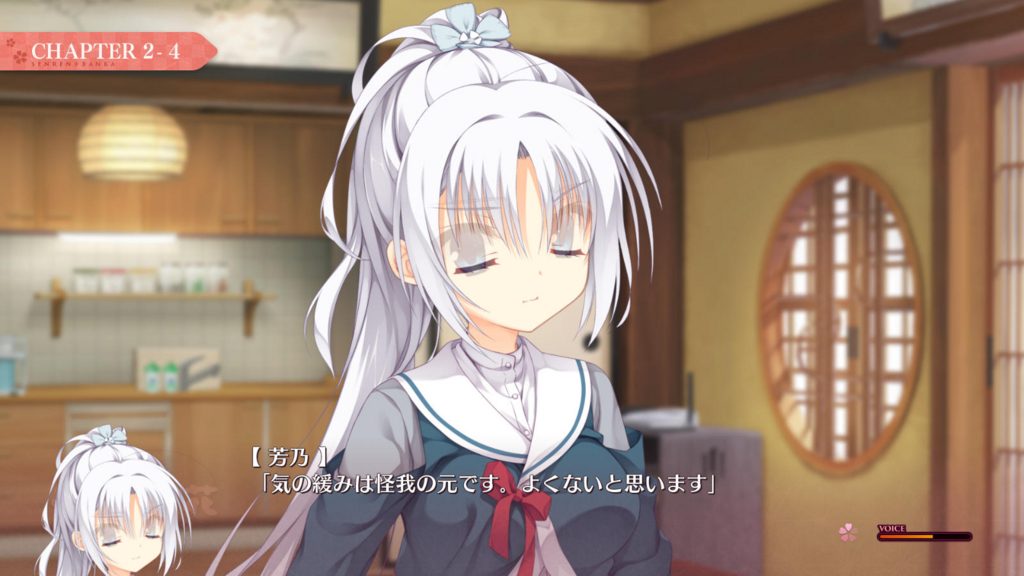
This image detected
CHAPTER 2-4IR 11【 芳乃/気の緩みは怪我の元です。ぽくないと思います
. This result is good.
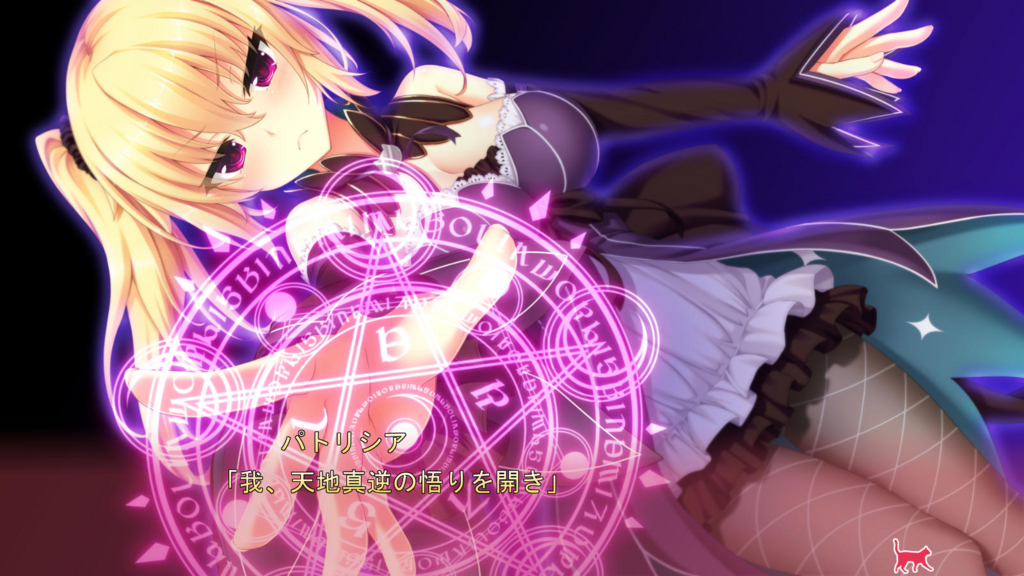
Next image is only detected
0O
.
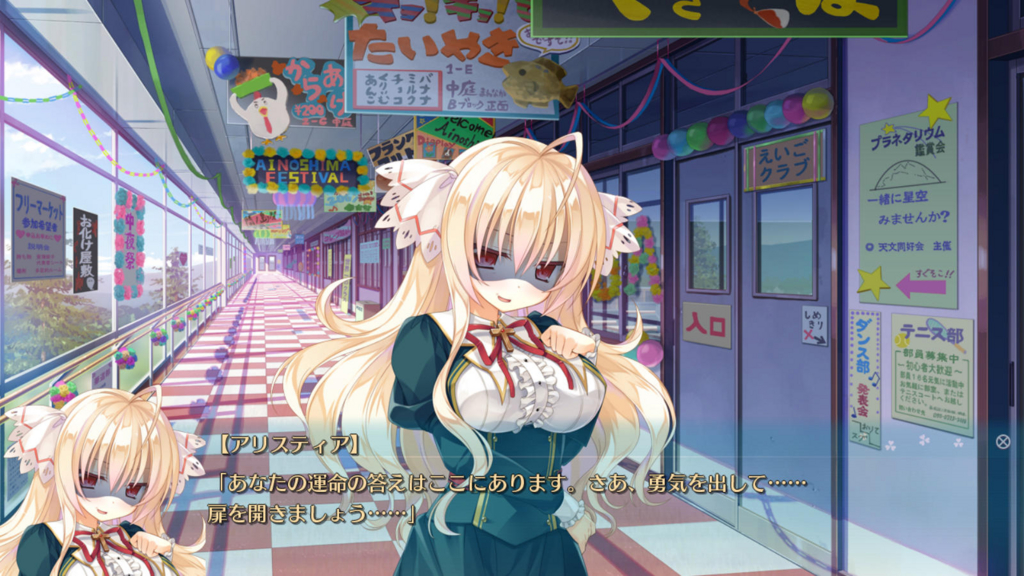
Next image is detected
St1-E中庭3むコクナプラネタリウム鑑賞会VALプ一緒に星空みませんか?0天文同好会主催3(をこ!?テニス部部員募集中:部 lito0者大歓迎「あ のiEANの認はあります扉を開ましょうAl ...ダンス部.カ中夜祭
. This result show us that out of text box region is also detected.
I used R language, but you can use Python etc too. The R code is referenced from d.hatena.ne.jp. The code makes OCR to SS which uploaded to imgur album.*2 You can change easily that you can recognize your local image.
At first time, you should once run following code.
install.packages("httr")
install.packages("base64enc")
install.packages("imguR")
The OCR code is below.
rm(list=ls())
#add size to argument
getResult <- function(f, type = "TEXT_DETECTION",size){
  library("httr")
  library("base64enc")
  CROWD_VISION_KEY <- "********************" #your api key
  u <- paste0("https://vision.googleapis.com/v1/images:annotate?key=", CROWD_VISION_KEY)
  img <- readBin(f, "raw", size)
  base64_encoded <- base64encode(img)
  body <- list(requests = list(image = list(content = base64_encoded),
                               features = list(type = type,
                                               maxResults = 5),
                               imageContext= list(languageHints = "ja"))
  )

  res <- POST(url = u,
              encode = "json",
              body = body,
              content_type_json())
}


library(imguR)
user_name <- '*********' #your imgur username
tkn <- imgur_login()
if(!account_verified(token = tkn))
  send_verification(token = tkn)
account(token = tkn)
album<-get_album("*****") #your album url http://imgur.com/a/*****
album_title<-album$title
imagesNumber <- album$images_count
for(i in 1:imagesNumber){
  #imageURL <- c(imageURL,album$images[[i]]$link)
  filename <-album$images[[i]]$link
  size <- album$images[[i]]$size
  res <- getResult(filename, "TEXT_DETECTION",size)
  textbox<-content(res)$responses[[1]]$textAnnotations[[1]]$description
  textbox <- gsub("\n","",textbox)
  temp <- c(filename,textbox,album_title)
  write.table(x = t(temp), file = "imgur_ocr.csv", col.names=FALSE,sep = ",", append = T)
}
If you are beginner for programming, following instruction may be helpful.
- install R language
- install RStudio
- Getting API key for Cloud Vision
- upload SS to imgur and register to album
エロゲのSS(ScreenShot)をGoogleのCloudVisionを使ってOCRする
エロゲ(Visual Novel)のSSのOCR(文字認識)はEvernoteでなされた記事があるが、
実際にやってみるとあまり上手くいかなかった。
これは、SSは通常背景の上にテキストボックスがあるが、透過度の設定値を上げることによって一様でないノイズが文字に加わることが考えられる。
OCRのソフトには、TesseractやGoogleCloudVisionなどがある。
Tesseractのversion4.0でneural networkを用いるようになったので有用そうではあるが、今回はCloudVisionを使う。(tesseract3系を使っていたけど全く上手く認識できなかった)
細かいことは一旦置いて、結果から。
この画像だと、
CHAPTER 2-4IR 11【 芳乃/気の緩みは怪我の元です。ぽくないと思います
と認識されている。CHAPTERも認識されているがまあまあ上手く認識できている。
次にこの画像だと、
0O
とだけ認識されている。
これは、
St1-E中庭3むコクナプラネタリウム鑑賞会VALプ一緒に星空みませんか?0天文同好会主催3(をこ!?テニス部部員募集中:部 lito0者大歓迎「あ のiEANの認はあります扉を開ましょうAl ...ダンス部.カ中夜祭
と認識されています。テキストボックス以外のところも認識されている。
例は示しませんが、SAVELOADなどの文字も認識される場合が多い。
しかし、私はSSのOCR結果の一覧を作ってそのとき貼りたいSSを文字列検索して見つけることができればいいので問題ない。
実行コードはR言語を用いた。ただ私がやりやすいのを使っただけでPythonでもできる。
コードはd.hatena.ne.jpを参考にした。
Rを初めて実行する方は、
install.packages("httr")
install.packages("base64enc")
install.packages("imguR")
を実行するといい。
コード中ではimgurにアップされている自分のalbumのSSに対してOCRをかけるようになっている。(私がそうやって管理しているので)
ローカルにあるSSを認識したい場合は参考元を見ながらやればできると思う。
rm(list=ls())
#sizeを引数に取るように変更しました
getResult <- function(f, type = "TEXT_DETECTION",size){
  library("httr")
  library("base64enc")
  CROWD_VISION_KEY <- "********************" #your api key
  u <- paste0("https://vision.googleapis.com/v1/images:annotate?key=", CROWD_VISION_KEY)
  img <- readBin(f, "raw", size)
  base64_encoded <- base64encode(img)
  body <- list(requests = list(image = list(content = base64_encoded),
                               features = list(type = type,
                                               maxResults = 5),
                               imageContext= list(languageHints = "ja"))
  )

  res <- POST(url = u,
              encode = "json",
              body = body,
              content_type_json())
}


library(imguR)
user_name <- '*********' #your imgur username
tkn <- imgur_login()
if(!account_verified(token = tkn))
  send_verification(token = tkn)
account(token = tkn)
album<-get_album("*****") #your album url http://imgur.com/a/*****
album_title<-album$title
imagesNumber <- album$images_count
for(i in 1:imagesNumber){
  #imageURL <- c(imageURL,album$images[[i]]$link)
  filename <-album$images[[i]]$link
  size <- album$images[[i]]$size
  res <- getResult(filename, "TEXT_DETECTION",size)
  textbox<-content(res)$responses[[1]]$textAnnotations[[1]]$description
  textbox <- gsub("\n","",textbox)
  temp <- c(filename,textbox,album_title)
  write.table(x = t(temp), file = "imgur_ocr.csv", col.names=FALSE,sep = ",", append = T)
}
opencvのテキスト領域検出などを用いてテキストボックスの一番大きい領域を抽出してからOCRにかければ精度は上がるかもしれない。
ちなみに、CloudVisionは7336枚認識させて1066円です、60日以内なので無料ですが。
また、プログラム自体初心者の方は、
でRStudioを起動して上のコードを実行すれば良いと思います(たぶん)。
